
Entering a phone number
Dialing a number
When entering phone numbers, you can switch between entering letters and numbers.
Service numbers can be entered more easily, e. g. 1-888-BMW-CARD.
1. "Telephone"
2. "Dial number"
3. Select the digits individually.

4. Convert to letters as required.
 Select the symbol.
Select the letters individually.
5.  Select the symbol.
 Select symbol to convert to
numbers.
Select symbol to convert to
numbers.
The phone number can also be entered by voice.
Only numbers can be spoken.
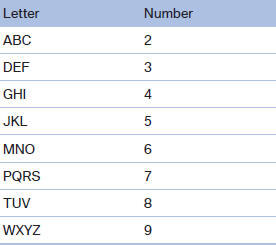
Letter/number assignment
See also:
Adjusting
Vehicle
Equipment
...
Controls
1 Change entertainment sources
2 Change station/track
3 Programmable memory buttons
4 Volume, on/off
5 Change wave band ...
Engine stop
The engine is switched off automatically during
a stop under the following conditions:
Manual transmission:
► Neutral is engaged and the clutch pedal is
not pressed.
► The driver' ...