
Entering a phone number
Dialing a number
When entering phone numbers, you can switch between entering letters and numbers.
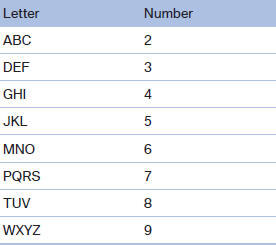
Service numbers can be entered more easily, e. g. 1-888-BMW-CARD.
1. "Telephone"
2. "Dial number"
3. Select the digits individually.

4. Convert to letters as required.
 Select the symbol.
Select the letters individually.
5.  Select the symbol.
 Select symbol to convert to
numbers.
Select symbol to convert to
numbers.
The phone number can also be entered by voice.
Only numbers can be spoken.
Letter/number assignment
See also:
In the glove compartment
Push the handle up, arrow 1, and open the lid,
arrow 2. ...
Storing the current speed
Push the lever, arrow 1, or pull it briefly, arrow 2.
Storing the current speed
The system stores the current vehicle speed. It
is indicated on the speedometer and briefly in
the instrument pa ...
Audio/video playback
Audio
Audio can be played back via rear entertainment
from any source in the vehicle.
Operation is the same as for the front audio playback.
Video
Video can be played back in the rear from the
...